You open your Instagram to add another memory to your Highlights, but there is an unpleasant surprise waiting for you. All the memories, travel diaries, podcasts, product reviews, and more that you have carefully shared and arranged in your Highlights are just gone. The first thought that pops up in your head is “Did I violate any policy?” or “Did Instagram delete all my highlights?” And this is going to lead you towards another question: why is Instagram removing my highlights?
A lot of users on the internet are searching for this same question. The short answer: Instagram didn’t remove your highlights, it moved them, without much notice. To understand the process behind this change, keep reading. To get a better grip on this change, you can browse Instagram profiles anonymously and get to know how others are dealing with this change.
What Are Instagram Highlights? A Quick Overview
Instagram Highlights are the selected Stories you pin permanently to your profile. Unlike regular Stories, highlights do not disappear after 24 hours; they stay on the profile as long as you want. These are the best way to keep your best content visible, especially for newcomers on your profile.
For creators, business owners, and brands, it works like a store display where everything is organized according to the theme and category. Highlights are one of the most viewed parts on Instagram. You can view Instagram Highlights anonymously to find ideas on how to arrange your own Highlights.
Why Is Instagram Removing My Highlights? The Truth Behind the Change
If your Instagram Highlights disappeared in 2025 or early 2026, it has nothing to do with Instagram removing your highlights. You just have to find them in a different place because they have been reorganized by Instagram. There is an update that Instagram has made by making a separate tab for Highlights and moving it down under the bio. Typically, when Instagram updates its features, it sends notifications.
The New Highlights Tab: What It Looks Like
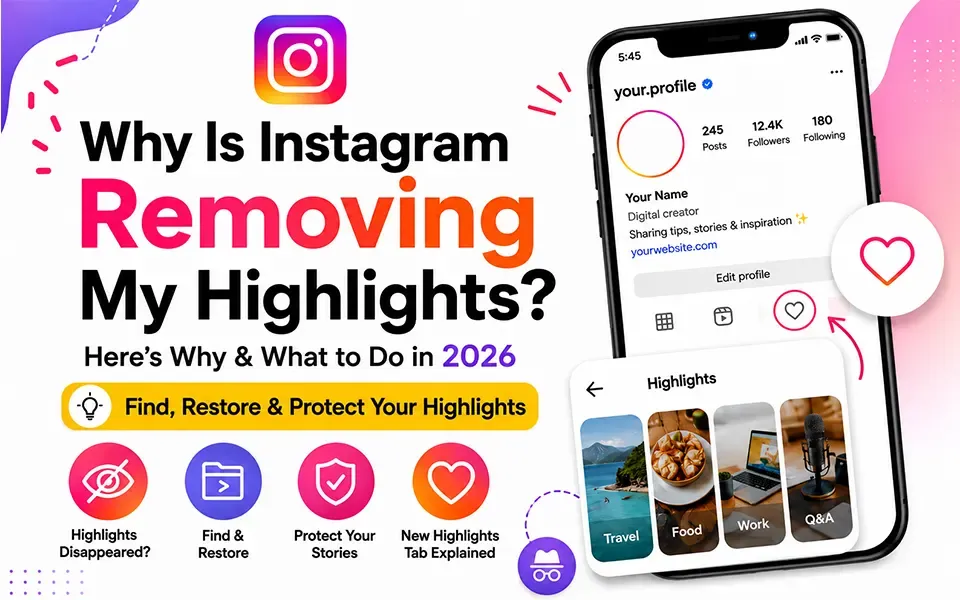
Instagram Highlights have moved into their own tab, replacing the familiar row of circular bubbles. To find them, look for the Instagram highlights heart icon tab, which can be easily found next to your post and reels icons. Tap on it, and you will navigate your way to the highlights, displayed as vertical thumbnails rather than horizontal circles.
According to Instagram head Adam Mosseri, the goal is to simplify the profile and bring more content “above the fold.” "We’re trying to figure out a way to improve the profile and get more of the content above the fold, and simplify it. You will still have control, but we don’t need to have pogs and squares pushing everything down." In other words, Instagram wants your grid and active content front and center, with Highlights one tap away in a dedicated Instagram highlights new tab.
Bug or Feature? How to Tell the Difference
It's easy to confuse a real bug with the new design, and the confusion is fair. The truth is, the Instagram Highlights bug some users have reported is real, and separate from the redesign, Highlights can briefly disappear after an app update and then reappear on their own.
The rollout itself has also been uneven. Not all users on Instagram have this highlights tab; some are still using the same circular display, which has caused even more confusion because users on the same device, same app version, see completely different layouts.
Instagram Highlights Not Showing on Profile - Common Reasons
Beyond the redesign, there are several other reasons your Instagram highlights are not showing on your profile. Let’s break them down:
-
Privacy settings: As a user with a private account, the best first approach is to check Instagram highlights privacy settings. Only followers are allowed to see your highlights if the account is not public.
-
Visibility controls: The new Instagram highlights visibility settings allow you to choose which Highlights appear in the main grid versus only in the dedicated tab. If you haven’t configured these, some Highlights may be hidden by default.
-
Loading errors: If Highlights are not loading, the app may be the issue. Clear the cache, switch between mobile data and wifi, or update the app.
-
Profile glitches: Sometimes, Instagram profile highlights missing is purely a display error that resolves after a forced app refresh or device restart.
It’s worth noting that Instagram’s 2025–2026 rollout has not been smooth for everyone. Reports across Reddit and tech forums confirm that some accounts experienced temporary Highlight disappearances unrelated to the new tab design.
How to Save and Restore Your Instagram Highlights
Whether you’re troubleshooting a bug or simply being proactive, knowing how to restore Instagram highlights is essential. Here’s a step-by-step approach:
-
Check the heart icon tab on your profile first; your Highlights may simply be there.
-
Go to Settings → Archive and ensure your Story Archive is enabled.
-
If a Highlight appears empty or broken, delete it and recreate it from your Archive.
-
If Instagram highlights are permanently deleted, check your Archive going back to the original Stories.
This is exactly why it’s smart to save Instagram stories before they disappear. You can also watch Instagram stories without an account using smart tools like FreeSave.
Is Instagram Removing Highlight Bubbles for Good?
The Instagram profile redesign has sparked real concern among creators and marketers. The core criticism is straightforward: by Instagram removing highlight bubbles from their prime location below the bio, Instagram has tucked a key content feature behind an extra tap.
Critics of this Instagram feature removal 2026 note that Highlights were one of the most discoverable parts of a profile. Moving them to a tab that many users may not even notice initially could meaningfully reduce organic Highlight views.
Instagram’s counterargument has merit. Profiles do look cleaner without the cluttered bubble row. The Instagram highlights update 2026 also gives creators control over which Highlights surface in the main grid, providing a hybrid approach. And since engagement on Reels and the main grid tends to drive profile visits, those first-impression moments matter more than ever.
Final Thoughts
The disappearance of Instagram Highlights comes down to a layout change, not a mass deletion. In rare cases it's a bug, but most creators are running into the new tab design, not lost content. Your stories have not been deleted by instagram, and neither is it a glitch. It's just a better and cleaner design of the app, which helps you navigate things easily. It might be a couple of more taps, but it is also more arranged.
The smartest move right now is to understand the change, adapt your content strategy, archive your Stories diligently, and make sure the Highlights you care most about are pinned visibly. Social media is always in motion, and the creators who stay informed and flexible are the ones who thrive through every update. Your Highlights aren’t gone. They just moved. Now, so should your strategy.
FAQs
Is Instagram permanently removing the Highlights feature?
No, Instagram is not removing Highlights; it's moving them to a new dedicated tab next to Posts/Reels, which made them seem "disappeared" to some users in 2025.
Why did my Instagram Highlights suddenly disappear in 2025?
They likely disappeared because Instagram rolled out the new layout or due to a glitch like an outdated app, poor connection, or a cache issue.
How do I know if Instagram moved my Highlights or deleted them?
Check for the new Highlights tab next to Posts/Reels or a “moved” notification; if absent, go to Menu → Archive → Stories Archive to see if your stories still exist.
Can I recover deleted Instagram Highlights?
Yes, recreate the highlight by tapping + under Story Highlights, selecting your archived stories, naming it, and saving.
Will the new Instagram Highlights tab hurt my profile engagement?
It may slightly reduce engagement because the tab is less visible than the old row above your bio, leading to fewer casual clicks.
How can I protect my Instagram Stories and Highlights from future deletions?
Enable Save story to archive, keep Instagram updated, clear cache or reinstall, check your internet, and periodically export your data via Account Center → Your information → Export.